10 Creative Ways to Use Your Drone Footage (Beyond Just YouTube)
So, you’ve been out flying, you’ve got beautiful sweeping aerials, epic sunsets, and cinematic coastline shots — but now what? If your drone footage is just sitting on a hard drive or only making a brief appearance on YouTube, you’re missing out on its full potential.
Here are 10 creative, practical, and even profitable ways to repurpose your drone content that go far beyond uploading to YouTube.
1. Turn Clips Into Instagram Reels and Stories
Instagram heavily favours short-form video content like Reels and Stories — and drone footage is naturally eye-catching. A 10–30 second clip of a sunrise, cliffside flyover, or ocean pan can stop the scroll and earn serious engagement.
To make your drone content stand out:
- Edit your footage in vertical (9:16) format for Reels.
- Keep it under 30 seconds.
- Add trending audio, on-screen text, and geo-tags.
- Include a call-to-action (e.g. “Save this spot!” or “Link in bio for more”).
Example: A slow reveal over Palm Beach with text overlay “One of Sydney’s most scenic drone spots ” — linking to your blog or guide.
Bonus: Use your Reels to preview your drone guides, like: Top 5 Beaches to Fly a Drone in Sydney
2. Sell Clips on Stock Video Sites
High-quality drone footage is in demand — and you can earn passive income by uploading your best clips to stock platforms like:
Tips for better sales:
- Record in 4K with smooth, steady motion.
- Keep clips between 10–30 seconds.
- Avoid footage with people (unless you have a signed release).
- Use keyword-rich titles and descriptions to help buyers find your content.
Example: “Drone footage of surfers at sunrise – Byron Bay Australia – 4K UHD aerial clip.” This kind of footage is perfect for tourism videos, commercials, and YouTube creators looking for b-roll.
Want more ideas for making money from your footage? Read: How to Start Earning Money with Your Drone
3. Create Digital Products (Drone + Location Guides)
Your footage + your location knowledge = a sellable digital product. You can bundle drone video, aerial stills, Google Map pins, and local flying tips into downloadable guides.
Ideas for digital products:
- “Top 5 Scenic Drone Spots in Northern NSW” – with video previews and safe fly tips
- “Weekend Drone Trip Planner: South Coast Edition” – includes maps and weather tips
- “Best Instagrammable Beaches from Above” – includes flight altitudes and angles
Where to sell them:
Example: A PDF called “Drone-Friendly Beaches Near Sydney” featuring your aerial shots, fly zone warnings, parking info, and bonus tips like “Best time to shoot for golden light.”
Want to see how it’s done? Browse: Drone Guides on AdventureHQ
4. Use as Website Background Video
Want to make your website look instantly high-end? Add a drone clip to your homepage header. A short, looping aerial of waves, forests, or your local landscape can add movement, mood, and polish.
Here’s how to do it right:
- Use a 5–10 second MP4 clip.
- Compress to under 10MB for faster load times.
- Mute audio and loop the clip.
- Choose smooth, slow-moving shots that won’t distract from on-page content.
Example: A tourism blog features a 7-second drone pan over Shelly Beach at golden hour — paired with text: “Explore Sydney from Above.”
You can even offer this to local businesses: cafes, retreats, real estate agents, or Airbnb owners looking for stunning first impressions.
Related read: Creative Ways to Use Your Drone Footage
5. Make GIFs or Cinemagraphs
Drone footage doesn’t just have to live in video format. You can turn short, subtle aerial movements into beautiful GIFs or cinemagraphs — perfect for websites, blogs, emails, or even Pinterest pins. These looping visuals add movement without needing full video players.
Best types of drone shots to convert:
- Waves gently lapping the shore
- Clouds drifting over mountains
- A slow pan across a calm lake or river
Tools to use:
- Canva Pro – for simple video-to-GIF export
- Adobe Photoshop – to create looped GIFs with fine-tuned control
- Giphy GIF Maker – for social sharing
Example: A 3-second aerial loop of a lone paddleboarder on turquoise water can become a cinemagraph that’s perfect for a travel blog header or social media teaser.
6. Pull High-Resolution Still Images from Video
If you shoot in 2.7K, 4K, or higher, you’re capturing thousands of frames per minute — many of which can be extracted as still images. This is a game-changer if you forgot to switch modes mid-flight or want to create content from a single video shoot.
Benefits of frame grabs:
- Great for blog covers and social banners
- Perfect for photo books, prints, and thumbnails
- You can create multiple assets from one flight
How to extract stills:
- Use DaVinci Resolve or Adobe Premiere Pro to export frames
- Even VLC Media Player can take high-res screenshots
- Name your extracted files with “_Still” to stay organised
Example: A paused frame of your drone gliding above Long Reef at sunset could make a beautiful 8×10 print, or serve as your next blog hero image.
Learn how in detail: How to Get Photos From Drone Video Footage
7. Enhance Your Email Newsletters
If you send newsletters, a well-placed drone image or looping GIF can make a big visual impact — especially if you’re sharing location-based content, promoting a guide, or previewing new travel footage.
Ways to use drone media in emails:
-
- Add a banner image showing your favourite beach flyover
- Create a teaser GIF that links to your latest Reel or blog post
Example: “This was my view this morning ” — paired with a 3-second drone shot of sunrise at Narrabeen Lake, leading to a blog post with travel tips.
Drone footage builds brand and personality. It helps your audience connect with your experiences — not just your words.
8. Build Location-Based Content for Tourism or Real Estate
Drone footage is powerful in helping businesses sell a place — whether that’s a coastal town, a farm property, or a hiking destination. You can repurpose your drone clips to pitch or sell to:
- Local tourism boards
- Real estate agents or developers
- Eco-resorts, caravan parks, or regional councils
Package your footage into a short “location reel” with text overlays and license it directly or sell access through platforms like Vimeo, Dropbox, or your own site.
Example: You could edit a 45-second scenic showcase of Shoal Bay’s dunes, walking tracks, and sunset coastline to pitch to a boutique holiday rental or local business wanting fresh marketing content.
Related: Drone Guides can help you develop location-based products too!
9. Add to Your Digital Portfolio or Showreel
Whether you’re a drone specialist, a travel blogger, or a web designer, including high-quality drone clips in your digital portfolio elevates your presentation. It shows technical skill, creativity, and the ability to capture visuals that others can’t.
Where to showcase your drone work:
- As a highlight reel on your website
- Embedded clips on a “Services” or “Media” page
- On Behance, Vimeo, or LinkedIn
Example: If you’re a web designer building tourism sites, your hero background videos from actual flights can double as portfolio examples and samples for future clients.
Don’t bury your best work in folders — show it off where it matters.
10. Create B-Roll Libraries for Freelancers or Editors
Chances are you’ve got loads of 10–20 second clips that didn’t make it into full videos. These are perfect for creating drone B-roll libraries — something in-demand among editors, marketers, and creators looking for extra footage without flying themselves.
Ways to use your B-roll:
- Create a “Drone B-Roll Pack” sorted by location or theme (beaches, cliffs, waves)
- Offer a free download as a lead magnet to grow your email list
- Sell packs for $10–$50 on Gumroad or through your website
Example: “Aerial Coastal Pack: 15 high-res clips of NSW beaches” — use them as upsells with your guides, or bundle for editors looking for filler content.
Want to start monetising smarter? Read: How to Start Earning Money with Your Drone
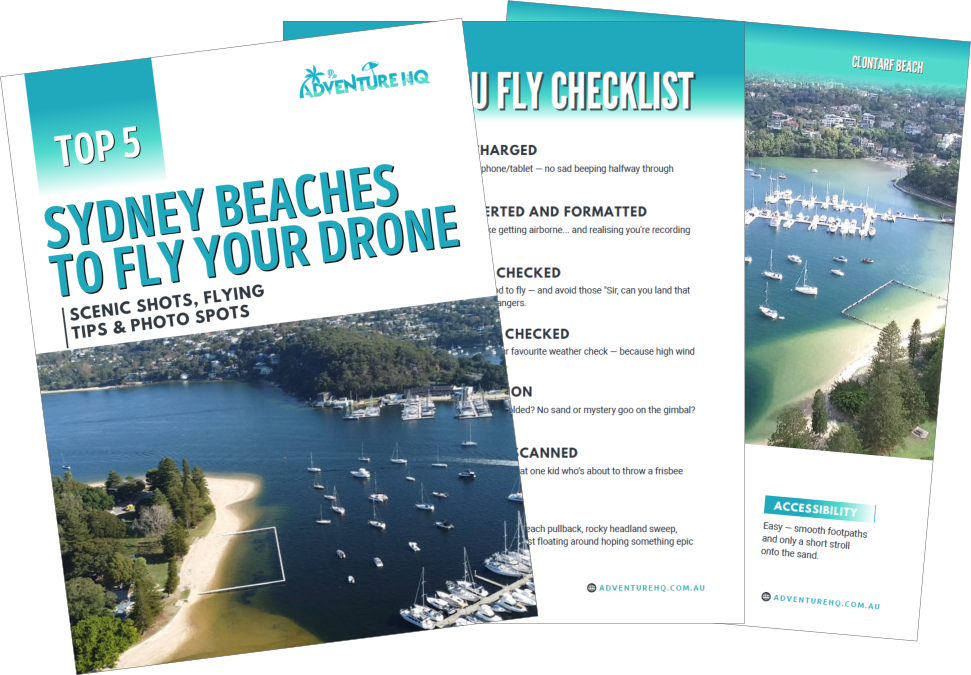
Want to Know Exactly Where to Fly in Sydney?
If you’re tired of Googling “where can I fly my drone?” and just want clear, beginner-friendly advice — I’ve got you.
I created a printable Sydney Drone Beaches Guide that includes:
- 5 legal, beginner-approved beaches
- GPS pins for takeoff points
- Tips on when to fly and what to shoot
- Real drone photos and layout previews
It’s based on lived experience – not just a map.
FAQs About Ways to Use Your Drone Footage
What can I do with drone footage besides uploading to YouTube?
You can repurpose drone footage in many ways beyond YouTube. Popular options include:
-
Instagram Reels and Stories
-
Stock footage licensing
-
Digital products (like drone location guides)
-
Website background videos
-
Social media content, email newsletters, and GIFs
These strategies help you reach new audiences, build your brand, or even create passive income.
How do I make money from drone footage?
There are several ways to monetise your drone footage:
-
Sell clips on stock sites like Pond5, Shutterstock, and Artgrid
-
Create digital drone guides and sell them on Gumroad or Etsy
-
Offer location footage to real estate agents, tourism boards, or content creators
-
License short videos as website or marketing material for businesses
-
Bundle unused footage into B-roll packs for freelancers or editors
Can I use drone footage on Instagram?
Absolutely. Drone clips work beautifully in Instagram Reels, Stories, and grid posts. For best results:
- Crop your footage vertically (9:16) for Reels
- Keep clips under 30 seconds
- Add trending audio and location tags
- Include captions or call-to-actions for better engagement
What are the best websites to sell drone footage?
Top sites to sell drone clips include:
BlackBox
Make sure your footage is 4K, well-composed, and properly tagged with keywords to increase sales.
Can I extract still images from drone video?
Yes, especially if you record in 4K or higher. Use software like DaVinci Resolve, Adobe Premiere Pro, or VLC Player to grab sharp still frames. These images are great for:
- Social media
- Blog headers
- Website banners
- Prints and digital photo products
How do I use drone footage on my website?
Add short, silent MP4 video loops (under 10MB) as hero section background videos. Choose calming aerial shots with slow motion, and ensure the footage doesn’t distract from text or buttons. It adds a professional, immersive feel to business, travel, or portfolio websites.
Is it legal to sell drone footage?
Yes — as long as your footage complies with local drone laws and doesn’t include:
- Private property without permission
- People without signed model releases
- Restricted airspace or national parks
- Always fly legally and responsibly to ensure your footage is safe to license or sell.
 ***
***
Ivana Katz is a Sydney based website designer and travel blogger. Having her own business has given her the freedom to explore the world. She believes travel is the best teacher and her passion for adventure, writing and photography has taken her and her son to some amazing places, including Hawaii, Canada, Fiji, Greece and Czech Republic. Ivana’s favourite thing about travelling is learning, discovering hidden gems and creating memories. She loves nothing more than inspiring other women to chase their dreams and explore the world with their families and friends.